Gripping title right? Many years of doing this. Not only does the moodle need to be kept up to date, other technology on the server needs to also.
OS – Stack – Moodle – those are layers
If you want to update the moodle, you have to update the stack – which in this case is WampServer 3.1. Before you update Wampserver, update the OS, thats Windows. After you update the Windows and before you update the WampServer, update the Windows the a little more with these distribution packages.
I was hoping to avoid all this by retiring this month, let the next guy worry about it. Alas, I’m still working for now.
This is my process for both of our moodle servers, since we do not use a moodle provider – we get to play server administrator and cloud provider – so to speak.
Its enough to stay up on the moodle – throw in there the server architecture and its down right bothersome. It is my job, part of it anyway; so I’ll suck it up buttercup and stop bitching about it.
I did a test install of the moodle latest, 3.9 and upon loading the update form discovered that moodle 3.9 requires PHP 7.2. The Wampserver running on both moodle servers is at 3.1.0. I looked at the Wampserver forum and started a discussion. My plan now looks like this.
Update the OS first – since its an old version, not a requirement of updating the Wamp server, just a good idea. Perhaps bringing it up to speed will include some of the V++ packages that is the step after the OS and before the Wampserver upgrade to 3.2.2.
The support from Wampserver was good, this is the conversation with them regarding upgrading the PHP.
They helped me by listening to my needs and redirecting or clarifying my thinking….I state what I think is needed, they clarify, rinse and repeat, until you get to the final assertion to which they say “yes, you got it”.
At least I feel like i have done my diligence in fleshing out this conversation. It really not too complicated, only risky. Changes to a stable production server are not what engineers want to do. But, necessary.
The other thing I was into yesterday regarding our moodle sphere was retiring a couple old DNS entries or records. Part of Wampserver is Apache – the web server. I have virtual hosting happening on each of the servers – multiple versions of moodle running on the server, on top of Wampserver.
When I finally got around to commenting out and the removing some old configuration info from both the vhost.conf file and the Windows hosts.txt file, I found that the DNS record would still process – of course, but since it had no definition in the vhost.conf file, it would default to the top definition – and display the wampserver homepage…. which is not idea either, but it was a good ah ha.
Say it another way. If there is still a DNS record for say flss.edutechmoodle.org but the vhost definition that tells this DNS where to look for its important information is gone, then the first definition in the vhost file springs into action.
Once the DNS record is gone from your directory – then it wont matter if there is a vhost definition or not…. the URL will simply not load anything
This makes more sense to me in hindsight, naturally. I have been reluctant to update anything in these environments because they were stable. To repeat a mantra from earlier, no engineer wants to upset a stable environment – especially one that was unstable for a period leading up to the prosperous stability 😉
But, alas, the prosperity must come to and end and updates must be done. Yesterday was that day for me. Our Network people got back to me on a request to remove some old DNS entries and forced me to look harder into those configuration files on the server.
Again, mainly the apache vhost.conf file and then the corresponding Windows host.txt file and then code directories on the moodle servers. We had a few of our moodle instances retired over the past couple years and I was reluctant to make changes to the said technology. I just put the moodle site in maintenance mode and left everything in place and stopped any updates to it.
Ok, here we go again. About 2 years ago, I went through a challenging time in support of our moodle. We host moodle sites and moodle runs onto of WAMP (windows, apache, MySql and PHP). Every now and again, moodle upgrades require newer versions of PHP. I just checked the newest release , 3.9 and found out that it requires a newer version of PHP. WAMP server 3.1 runs PHP version 7.19. Moodle 3.9 requires PHP 7.2.x. So there you have it. Another infrastructure upgrade. Shisa! Thats shit for none german speaking individuals. This caused my a couple hrs of angst this am. I gloomed around the house, my wife said “whats wrong honey?”… I said “Well you know how moodle sometimes required the underlying STACK software to upgrade?…”
Blogging has always helped me to process things… to see things a little more clearly… to calm myself down and to see the big picture.
So, what to do? I see two options.
1 – try to upgrade just the PHP in the Wamp stack
2 – create a new installation of WAMP with newer versions of Apache and MySQL too.
In my previous incarnation, I decided for option two. I am only considering option 1 because it looks like Wamp now allows for specific upgrades of components. There are individual downloads of the WAMP stack pieces. I dont recall seeing that last time around. I downloaded PHP 7.4.x to the moodle server. I would never just try that on my live servers, no way. The most stressful thing that could happen is crashing the moodle. Then I have a problem, a big one. Rather, I will have our network guys put up a RD server where I can practice.
Options for my RD instance
1 – have a duplicate of the current moodle server put up
2 – have a clean empty server put up.
Option 1 would be for option 1 – meaning I would try installing the downloaded PHP application and see what happens – maybe I would get lucky.
I guess either way, Ill have to update the PHP settings that moodle requires. There are a few of them that I had to tweak a couple years ago. With option 1, I dont have to worry about new MySQL and Apache and vhost files or the numerous other scripts that need to run on Windows that are required. Think Visual C++ runtime packages. I had to run about 8-10 of these on the new server last time prior to Wamp 3.1 even installing.
On the other hand, i would go for 1 server, -vs- 2 in current situation. A new clean server would allow for updated versions of all the components, not just PHP – I could put up new instances of the moodle sites and use moodle backup and restore to bring relevant courses over from other server. I did this exact thing previously. But, it was a lot of heavy lifting that I would have to do again. Heavy lifting is working through the server preparations, Visual C++ files, Wamp install, backup and restoring of courses from one server to another…..this feels too intrusive, like last time. It makes sense that we could update parts of Wamp independently. Since moodle is not the only software running on Wamp. Those other applications, like WordPress also run on Wamp. As a matter of fact, my colleague recently did a required PHP upgrade on our WordPress site that we run for another project. Hmmm, he did just that. Upgraded the PHP and only the PHP on the existing server. I asked him about it, picked a day, and in about 1 hr, he was done. Now WordPress is a fine platform and this process was im sure simpler than the moodle.
If I went with a new server and prepped it and installed the Wamp tip, I could set up the 5 moodle instances on one server, rather than two. Which is a little better, I think. How this would happen is like this. New server with Windows 2016 server, I prep it, ready it, do my testing, all in a safe place away from the current live servers, when I am ready, our network guys switch over to the new ip address and those DNS’s for each of the moodle becomes live. Thats what we did last time. We choose a time when the switchover would happen.
I am currently runner WAMP 3.1 – I blogged a few times about it in this very blog. I should look at those posts as well. Prep my brain a little more.
This is the Wampserver forum with downloads and support forums available.
My leaning at the moment is to have a duplicate server set up that I can try running the PHP update on. If it works there, then I would be much more comfortable about running that on one of the live servers. If it updates on the test/RD copy of one of the moodle servers, and I am able after the update to PHP7.4.x, install moodle 3.9 – then that is the way I will go. I would need to run that on each of my live moodle servers. One of the moodle servers tho is running Windows server 2008 – the other Windows server 2016 – so that is a small concert too…. what if PHP 7.4.x wont install on the old ass Windows server 2008….
It would be desirerable from that standpoint to have just a single server running WS 2016 or even 2020, if thats what our guys are installing now on new server requests….
I have a request for a report in our schooltool platform. Its an attendance report that lets parents know how many times their kid has been absent from school, with a little bar chart for visual help.
The idea is build this report so that it can sit on any of the schooltool servers or district application servers. We have 45 school districts that we support. One of the districts requested this report and the vendor, Mindex, created it. It is sitting on one of the school districts servers, plus our training or development server. I need to leverage this example and build our own.
The bigger idea is make the report acgonostic to its environment. The report could sit on any of the district servers and make it data call and display the report for the student with the chart. Thats it.
The report is build using Crystal Reports, which I have a installation and license for.
I will create prototype the report with fake data initially so I can focus on the report layout and building the bar chart. I will use the same database field names that I expect to find on any of the ST databases that the application server is calling.
Once I have the prototype working, I will focus on the data call. The connection information that is needed in the Crystal reports engine.
There are a number of formula fields (calculated) created by Crystal in the report.
The report also uses parameters for a interactive usability. The report loads and prompts the user for the schoolyear and building. This helps the report to be more scale-able and useful to the district.
I think Crystal is using stored procedures to call the DB and return the data set. That is a key part. Maybe it will be simpler than I anticipate. I have a blue print on how its working, now need to replicate and pull apart to assert my understanding.
I will need to get some connections to DB server, and instances, so I can view the stored procedures. I may need to also replicate the stored procedure in the DB so it is available in each instance. I should also talk with a couple colleagues who have done similar work here. Utilize the staff resources.
Nice title right? I work with a bunch of data people. They have these systems that have to share a lot of data! In NYS, thats a LOT of data. Most of our public school districts are now using an app called schooltool. Schooltool is a SMA (school management system) it is a *local software application that houses all the required – *mandated data. Mandated by big daddy NYS. A district chooses to use a LEA, like schoolTool and in doing so agrees to use it and feed it on a regular basis and by many people with different needs / permissions. Data captured by the LEA is then *ported or scripted or copied from or uploaded to our wonderful state reporting system, where there are 3 levels. Local, level 0, region, level 1 and then finally to the state level 2. Most of the *state mandated reporting comes from the level 2 warehouse. Think of it like this. The data begins its journey at the local level then proceeds up the stream to level 0, then level 1 then to level 2. Each step involves more scrutiny, testing and updating – cleaning if you will. When I say cleansing, I dont mean the data changes, although that happens too, I mean it gets scrubbed or formatted. Data that is not complete gets kicked to the curbe, so to speak. Before data is allowed to move up the stream, it must pass certain tests. Those tests often are in the form of reports. Run this report or that report, you better ensure the data is complete and accurate before moving it upstream.
SMS = school management system, like schooltool or infinite campus.
LEAS – local educational agencies, like RTI (right to know), Ed Eval system, School lunch etc.
“general data flow through the SIRS data warehouses”
This is what im saying!
“LEA NYSSIS users should next confirm that their official records (entry/exit enrollment codes, dates, etc.), as stored in their own student management system (SMS), matches what their RIC or other regional Level 1 data hosting site has recorded (through the Level 0 application, if applicable, or through any reporting service provided to them by their Level 1 provider)”
“Each LEA has a School Data Coordinator or District Data Coordinator who is responsible for overseeing data flow from the local LEA to the regional Level 1 Host Center.”
A good official explanation about some of the stuff i am droning on about….http://www.p12.nysed.gov/irs/nyssis/home.html
As the data moves up stream fewer people can actually manipulate it. Data security, specifically student data, personal data is very very very tightly controlled. NYS is the champ at creating regulation and edicts on student data privacy. All the folks in the data movement food chain know this too, they better not breach or leak data.
Each of these LOCAL – Level 0, Level 1 warehouses are repeated a bunch of times across our big state. Since level 0 is the local districts data, and level 1 is regional. This means there are 10 level 1 data ware houses across the great state of New York but only 1 level 2 “state level” warehouse. Its quite a large and complex system.
Some of the level 2 (this is where the scrubbed final data resides) reporting tools used by state and other agencies for data reporting include:
Extracts are used by the data warehouses. Think of it like this, a data warehouse is not going to let the data in in just any format. No! It must conform to certain expectations – think data types, field names empty rows, bedscodes (that a unique value identifying each public school in our great state.
Data is ported from local LEAS to level 0, from level 0 to level 1 and from level 1 to level 2 by very specific extraction plans or requirements. “Run the extract!” After running an extract, it can be tested by the importing data warehouse before it allows inserting on the data contained in the extract.
The LEA provides copied of data for the warehouse via a specific “extraction template”. The data warehouse knows what to check for since it uses the extraction template, it helps to keep things a little more controlled and predictable.
This is some light reading that is a couple years old, but you get the idea.
NYS (SIRS) data reporting guidelines (2015-16) its a little dated but conveys the massiveness of this project.
A nice visual of our (Western New York state) level 0 – 1 – 2 data movement.
Also, the time frame for data to move through the system LEA – Level 0 – Level 1 – Level 2 is very specific each week. If you really thought about it, you can see why this is necessary. For the state to be able to *ensure completeness and accuracy of reported data at the state level (level 2 warehouse), there would have to be a very predictable path for data updates. For example, in our region, data residing in local LEAS is extracted on Mondays and loaded to the Level 0 local warehouse. Each week on Thursday, data is moved from level 0 to level 1. Only data that is locked in the level 0 gets moved to level 1. A school district that wants its data to be included at the end of the week in level 2 needs to ensure that it gets moved on Monday, tested and moved to Level 1 by Thursday, so it can be moved to level 2 on Sunday. Rinse and repeat. This is the process that our districts and their data people follow every week.
Oh My! SIRS = “Student Information Reporting System”. New York state. In our state, we have a big government, in particular a large education department. New your state is famous for its educational edicts. Good, yes, bad, yes. Does the tail wag the dog? I fear that it does, but i digress before getting into the meat of this post.
Meat of post = how NYS handles required reporting of student data…
The state has a culture of the tail wagging the dog. State ed is the tail, public school districts are the dogs.
This is not new information. Its new to me.
My job has veired into data again. I work with two groups of staff at the BOCES. Group 1 are “Data warehouse”, group 2 are student systems.
SIRS is the “mandated by NYSED system for reporting public student information”. Student information =’s student names, school, assessments, attendance, and lots of other ancillary information.
Lets name the players first.
LEAS, level 0, level 1 and level 2 data warehouses or DBs. The school districts (LEA -local educational agency) works with a local RIC (that a BOCES in NYS). BOCES are government funded education agencies that assist the public school districts in many ways! Including meeting the mandated reporting requirements from the great NYSED.
The level 0,1,2 warehouses are also called Data Collections or
The LEA is usually a “student system” of sorts. That student system in our lovely state is mostly now a software system called Schooltool. This SMS (student management system – which is a LEA) is built just for NY State. Imagine that, a system built just for our great heavy handed state. Heavy handed = mandating reporting of certain data s and how to report them. Also then tying $ to the reporting and performance. Buy trying $ to the performance, well now you have a shitload of pressure on the district, its admin and its teachers to perform at certain levels. When those levels are not meet, corruption is simply waiting around the corner in the form of manipulating results, data or reporting of data to meet requirements…. Ah, but i digress again.
Back to the point
The LEAS report their data to the level 0 warehouse, which is also considered a *local datawarehouse. Other districts in the area also report their data to the level 0 warehouse. Data then moved up the pipeline to the level 1 warehouse which also hosts data from other regions around the state. Think of the level 1 warehouse as a *regional collection of required data. When data has been scrutinized, updated and *cleansed is a popular term, it makes it way up the pipeline a little further to the level 2 warehouse. The level 2 warehouse is where the state runs its required reports from.
NYSED basically says work with your local LEAS to get the data into level 0 and into 1 as necessary. Look at the data, manipulate it, ensure its complete and accurate, then and only then, move it to the level 2 warehouse.
This process is complete and fraught with big challenges. Data privacy is becoming a bigger one. As more and more data is *demanded by NYSED, the bigger the stakes in terms of protecting student information. Our great state just came out with another round of laws around this. http://www.nysed.gov/student-data-privacy/student-data-privacy-education-law
Pressure mounts on the districts (LEAS) to produce clean data as it moved up the pipe from its local system – level 0 – level 1 – level 2. Big pressure.
Staff in the local districts are assigned data privacy and reporting responsibilities. New positions are created and filled, but precedence is not really set. People are figuring out the process and the flaws as they go along. They freak out a little, especially as data reporting deadlines approach. Staff from the LEAS call us, my collegues anyway, and say things like
“I don’t see this piece of data or the other piece of data” or “i don’t think this report has all the records in it” or “I think this is what I need, this piece of data, that piece of data”… or “we need this data, a complete set of this data and some of the data is in this other system”. My colleagues help these districts staff members by figuring out things like
- Where is the data?
- Is the data complete?
- Is the data accurate?
- How do I pull that data together?
- How do I group the data the way its being requested?
- Does it meet the requirements set forth by NYSED?
I overhead a conversation the other day that centered around how to create a complete data-source (set) – file – import file for a new DB instance that was going up for a district. One of the staff was off to the district to *train them on their data. Show them the data in the am and then in the PM to work on it. That’s the cleansing part. We assume the data source file we created was complete now the staff members need to tweak it. The db in question would then become the source of the *extract for level 2 reporting.
And another just now about enrollment. Student enrollment reports are popular. We often are wading through questions like “which enrollment report?, period, daily, course..”. Sometimes the district staff is not even able to answer that, so much detail required by state ed….not enough training on how to deal with the “data gathering and reporting requirements”. Its becoming a full time job, literally for public school districts to have dedicated data officers or data experts or data reporting experts or Data warehouse Coordinators.
We, BOCES, have a concept of shared data coordinators that our districts can hire on a short term or shared basis. This model has worked for awhile, but it looks like districts are having to look again at staffing their own people. A lot of our districts are rural, dont have the $ for a new position, so they purchase our service. Is this the tail wagging the dog? I notice the only context we talk about teaching now is in prepping for assessments and APPR – that’s the part where the teachers status is measured in part by the performance of students on assessments. Oye. How are our teachers doing? Are they motivated? Don’t worry public, they are held *accountable by standards assessments. I am digressing again, sorry.
Data is moved from a local LEA to level 0 by using an extract. The extract is a pattern that the data being uploaded to the level 0 must follow. It is very specific and requires that data be in specific places and in expected format. The extract file is *loaded in level 0 and then checked to ensure the extract files header and data are in conformance before being uploaded to the level 0 warehouse.
Once in level 0, the data is scrutinized by key staff members using applications that report and allow this type of activity.
I am learning crystal reports. Much to learn. Great program. Easy to manipulate items, fields. Connects to lots of different types of data.
Over arching goal? To produce information from data! Create insights, show trends that otherwise are not clear when looking at the data.
What do we do? always these four things
- group things – adds meaning – ahhh, its more meaningful that way
- select (filter) – not everyone, just a and b, oh and maybe c
- sort (order) – can we see that in the other order? can we see it by “c”
- compute (sum, count etc) – how many? how bout an average?
Ask the questions first… Which districts did the best on the regents exams? Ok, how bout by test? What about by sex? Ask the questions, formulate your thoughts then build your report. This assumes the data you want is all successfully correlated in your data source. “Can you compare this group -vs- that group”? Why yes, as long as the data is stored in a way that allows that comparison.
Crystal excels at each of these things. Create your highest level grouping first (GH1) – the grouping will always have a matching footer (GF1). Look at your result… add your next grouping. Your grouping within your grouping. Notice another section added to the report (GH2 – GF2). Lets say the first grouping is the school district and the second grouping is the regents exams scores (ela, math, ss, science etc). Lets say you want the scores by male and female, or white and hispanic or urban -vs rural. etc…
Add a third grouping to the report, notice the (GH3 and GF3)… now you have meaningful grouping – reporting by (Sex, Area, Exam, District) –
Suppressing the details when creating group summary reports is very common. This shortens things up…since we don’t want detail most of the time…
Use the section expert (right click in the left column in section to highlight or suppress or whatever..
<CTRL> drag to duplicate a field – usually a text field…
We launched our new website software from Finalsite about 18 months ago. Part of that launch included feeds that allow us to embed social media into the website. Specifically, there are feeds that are registered in the software that can be displayed using a social media element in a web page on the site. Technically, not too difficult. I did discover that we had a limit to the # of feeds that we could register. I recalled that from our initial conversations with them (Finalsite). For a $, im sure we could have more ;).
Social media is a interesting thing. Twitter and Facebook in particular are popular with constituents in our organization. Staff uses them to promote their programs, to celebrate and inform audiences who care about what is going on in their corner of the BOCES world. Its more the main organization WFL BOCES, the Continuing Education – Adult Education and the the technical and career schools that utilize the social media. Our Education Centers tend not to promote or celebrate things going on in their schools – probably because they are special education institutions and share a unique challenge with their population.
The bigger challenge with social media in our organization is trying to set up rules and guidelines around it. The communication department has been concerned about the wild west syndrome of hashtags and tweets – what happens when socially questionable content ends up in your feed? Social media wants to connect, it wants to share, people follow things and hashtags get added to posts or tweets that are objectionable and boom goes the dynamite! …
The other question we wrestle with is the relationship between the website and the social media. Most of the *current happenings that you want on your website come from the social media feeds. We don’t want our website getting stale and irrelevant, we need fresh content to keep it from fossilizing. Our website has a concept of Posts or a blog, which translated to News boards, which is helpful, but that is a little labor some and tends to not get the traction we would like. I get it, our special ed teachers and admins are worried about many other things, the website and the freshness of news stories is not a priority. The twitter and Facebook posts tend to get much more traction. It is why they exist!
So – lets include the social media on the website – embed their feeds in a page – drive traffic to that page. There are things we can do if we commit to it.
Moral of the story?
- Social media is cool – its useful – it gets traction
- Social media can integrate with our websites (Finalsite)
- Register the social media feed in Finalsite
- embed the tweets/posts via a feed element in a page.
- Use the SM to keep the website looking fresh and relevant.
Like calendars, forms get a bit of traction in our business. I mean who doesn’t want to survey their customers? Or, who doesn’t want feedback from their customers.
18 months post launch with Finalsite – 11 websites, 35 actual forms in play, a few of them have alot of submissions, > 500. Most have some submissions > 50. A few have little submissions < 10. Submissions are after all the truest test of the usefulness of the form. We could do more to drive traffic to them, im sure, but if the form is useful, then people will take the time to complete a submission. If the response is good from us, then the next time the same person is contemplating using the form….
The forms are a separate module in FS. They have complex yet effective permission settings, so we can empower people, staff with editing rights in the software, to create their own forms. That is the preferred method – I think anyway. Sometimes when people try things they create problems that we have to correct which makes me think sometimes its better if we simply create the forms on their behalf….well, this concept is applicable all over the place in the software.
- forms
- calendars
- pages
- pictures
- media
- groups
But, I digress. The forms module has been pretty well received and utilized in our websites. The editing tools are solid, the help videos are useful and people have a practical use for them, so they are naturally motivated.
I did about a week ago go through all the forms in the manager that had been created since the launch of the software (18 months) and ended up dumping around 15 of them. They were created during initial trainings and just left there. Its good to clean things up from time to time, plus it informs my own global view of the element and how important, how much traction it has received/gotten.
Specifics – found that there is a 10 MB file upload limit. A little surprised by that, I looked for option to change that, but did not find it. If our customer who created a “upload” form has this need, i could inquire about that limit with FS. In general, I understand why uploading files to our FS server is not a grand idea, but 10 MB is pretty small! I would prefer to tell them to use Google drive or one drive or dropbox to upload files to and not FS.
Finalsite – our web site management software. We are now 18 posts launch, a few more reflections. Why? they help me to process and see things in a more succinct and conceptual manner. That is why…very valuable.
First – most people in our organization, 75 people have editing rights to the software. 11 distinct web sites. Some of the websites have taken off in terms of content and useage, others not so much. Our main site and our technology related sites and continuing education sites have all “taken off”. Our education centers – special education centers, have not.
Calendars. My ahas, we don’t have to create new ones each time we want to include calendar info on a web page. People like their Google calendars – if people like them they can keep them… 😉 I was working with Rich Y in the data warehouse area recently and he has a bunch of NYS calendars that release information around tests, scoring, warehousing etc. 10 in total. Rich tried to include those in his own Google calendar, but the concept is a little tricky – i guess the implementation is a little tricky, in his case, he knew what he wanted, just had a little trouble implementing.
What we ended up doing was registering the NYS calendar feeds in Finalsite. We did not have to make anything, but simply register the feeds. The steps are somewhat trivial, it was the concept that got me. I think i did not pay attention 2 years ago during the training we went on to Finalsite. Their boot camp training was a couple days, very intense and modular. I may have skipped the calendar module ;). Anyway, once the feeds were registered, we can consume them in a FS calendar element. We gave Rich the option to register the other calendars in his primary Google calendar – which is what he was attempting, but he choose not to do that, since we also demoed a FS calendar element, which included the data from all 10 feeds (NYSED calendars). Since we registered the feeds, we simply added the element to a page and told the element to include data from all of the newly feeded ICAL’s.
FS provides a few different ways to display the feed data, we showed his a few and he chose one.
Moral of the story?
Sometimes, concepts are lost and need to be found. Sometimes people need a little help. Sometimes they just want you to do it for them.
I met a new tech from Front-runner systems yesterday. We talked about the camera system awhile.
Cameras can be moved from archivers easy enough. We have 3 locations with cameras, each location has its own archiver. An archiver is a Windows server that keeps the video for 30 days for each camera. One of our servers was acting up, slowing down, streaming slowly. The tech and I actually called into another server provider that Front runner uses to look at the video activity on the server. It was a little interesting, watching the guy from wherever tinker around on our archiver. He remoted in and user the server monitor and some other SQL tools to measure the data transfer rate to and from the drive. Anyway, we ended up moving, by way of reassigned ips, the cameras to the other archiver in that location.
Now we have 1 archiver and the old archiver can be recycled by our organization. It has no more usefulness.
Back to yesterday. I was talking with Todd from Frontrunner about why some of the cameras were not recording and how Derrick the other Frontrunner guy who I have worked with for years, made some changes to the recording setting.
Takeaways
Outside cameras should have continuous recording on because they have a larger field of vision and may have smaller movements that you would want to record.
Inside cameras have a smaller canvassing area, they don’t see as far, since they are looking at a doorway or a hallway or a classroom. They have a record on movement setting, where the sensitivity can be set on the camera.
A little interesting anyway.
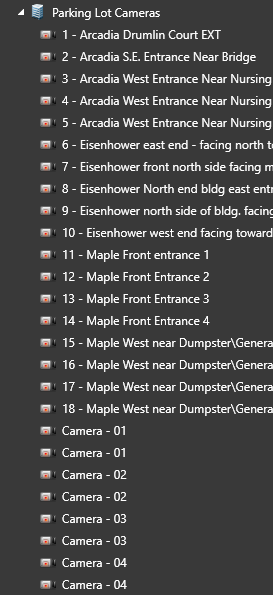
We also had two new campers installed looking over our parking lot, those must be set at continuous recording, by our new found understanding ;). They are two cameras with 4 views each that share the same IP address on the network.
There they are, those little devils – generic ones …
 james mergenthaler